Back to blog home
Door Controller: What It Is and How to Choose the Right One
by Team Rhombus, on July 2nd, 2026
Physical SecurityKey Takeaways
- A door controller sits between your credential readers and locking hardware, validating each access request and triggering the lock. It enforces your access policy at the door.
- Deployment model shapes everything else. On-premise controllers depend on a local server and manual updates, while cloud-managed controllers like the Rhombus DC20 keep enforcement at the device and management in the cloud.
- Evaluate door relay count, auxiliary relays, REX and door position inputs, reader protocol support, and connectivity before you compare prices.
- One four-door controller reduces panel count and wiring runs across a campus or multi-floor building.
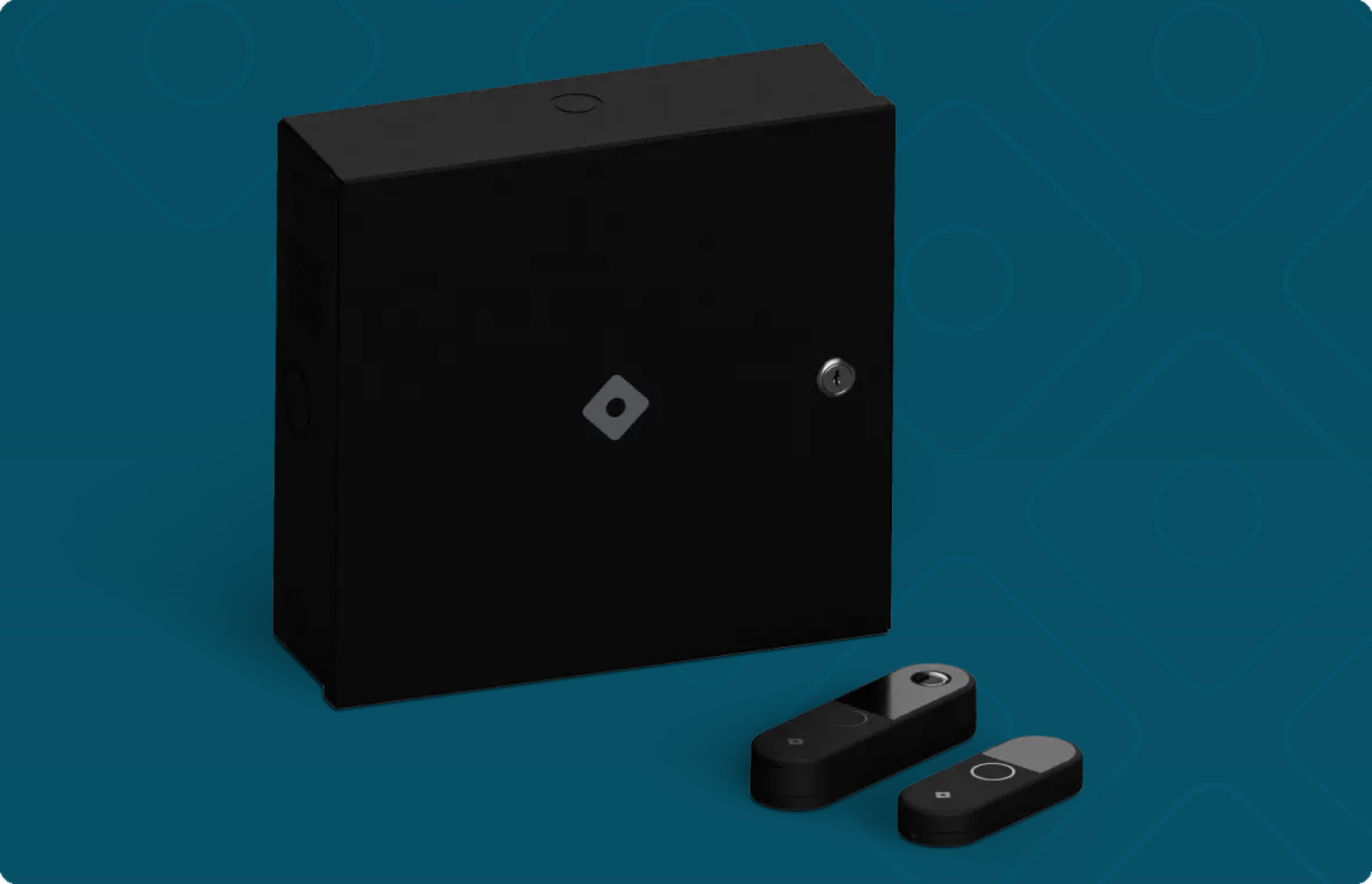
- The DC20 pairs 4 door relays, 2 aux relays, and Ethernet with a 10-year warranty and native integration into Rhombus cameras, sensors, and alarms.
What a Door Controller Does (and Where It Fits in an Access Control System)
A door controller is the decision-making hardware that sits between your credential readers and your locking hardware, and it decides whether a door unlocks. When someone taps a badge or fob at a reader, the controller checks that credential against your access policy and either triggers the lock to release or denies entry. Every access control system needs this component, because the reader and the lock cannot make that decision on their own.
The signal chain has four steps. A person presents a credential at the reader. The reader passes that data to the controller. The controller validates it against stored rules — who has access, at what times, to which doors — and if it clears, energizes a relay that releases the lock. If it fails, the door stays shut and the attempt gets logged.
Four distinct parts make up this chain, and buyers often confuse them. The reader captures the credential at the door and does nothing more. The lock is the physical mechanism that secures the opening, whether an electric strike, a magnetic lock, or an electrified panic bar. The management software is where you define policies, add users, and review audit logs. The controller enforces those policies in real time at the door, translating a software rule into a physical action. Knowing which layer does what tells you what you are actually shopping for when you evaluate a system.
The controller is the layer most tied to your deployment scale and cybersecurity posture, so it deserves the most scrutiny. A single controller can govern one door or several, and the way it stores policy and communicates with your network shapes how the whole system behaves when conditions change. The Rhombus DC20 illustrates this role well. It handles credential validation and relay control at the device itself while connecting to the broader Rhombus platform for policy management and logging, which keeps the decision fast and local even as administration stays centralized.
On-Premise vs. Cloud-Managed Door Controllers
Pick the wrong architecture and your IT team inherits the consequences for years. On-premise controllers depend on a local server inside your building. Cloud-managed controllers keep access decisions on the device but move management and record-keeping to a remote console. At one site the difference is minor. Across ten sites and a few hundred doors it decides whether your team runs updates manually or never thinks about them.
On-premise systems put a physical server at the center of your deployment. That server stores credentials, enforces policy, and holds audit logs, which means your team maintains it, patches it, and backs it up. At a single small office, the burden stays manageable. Across a multi-site enterprise, each location often needs its own server or a dedicated network path back to a central one, and firmware updates turn into a scheduled project rather than a background task. When the server fails, you lose visibility into that building until someone restores it.
Cloud-managed controllers split the job differently. The device at the door keeps a local copy of access rules and validates credentials on its own, so it decides who gets in without waiting on a network round-trip. Management, reporting, and audit logs live in the cloud, where you configure policy for every door from one interface. Security teams sometimes call this a cloud-edge design because the enforcement stays at the edge while the administration moves off-site.
The Rhombus DC20 shows what that split looks like in daily operation. The controller stores its access rules locally and continues granting or denying entry during a network outage, so a dropped connection never locks out a floor of employees. When the connection returns, the DC20 syncs its event logs to Rhombus Console, where an administrator reviews activity across every site in one place. Firmware updates arrive over the network rather than through a technician visiting each panel, which removes the manual update cycle that slows on-premise fleets.
For most enterprise buyers weighing IT overhead against scale, the cloud-edge model answers the harder problem. You avoid maintaining servers at every location, and you manage policy centrally while doors keep working when the network does not. On-premise still fits environments with strict air-gap requirements or existing server infrastructure, but it asks more of your team as the door count grows.
Key Hardware Specs to Evaluate
Most spec comparisons come down to counting inputs and outputs against what your building actually needs. Here are the seven that matter.
Door relays control how many doors one unit can operate. A controller with four door relays runs four openings from a single panel, which sets the boundary for how many card readers and locks it drives. The Rhombus DC20 provides four door relays, so a four-door entrance cluster or a floor with four secured doors runs from one device instead of four separate single-door units.
Auxiliary relays trigger devices beyond the lock itself. You use them to fire an alarm siren, release a secondary door on a schedule, or signal a building automation system when a door opens after hours. The DC20 includes two auxiliary relays, which covers most secondary automation without a separate module.
REX and DPI inputs handle the sensors already on your door. REX (request-to-exit) lets someone leave without presenting a credential, usually through a motion sensor or push bar. DPI (door position indicator) reports whether the door is open or closed so the controller can flag a door propped past its timer. A controller short on these inputs forces you to skip monitoring on some doors, which leaves gaps in your audit trail.
Reader protocol support determines how the controller talks to the reader, and this choice carries a security consequence. Wiegand is the legacy standard, and its wiring can be tapped to capture credential data. OSDP (Open Supervised Device Protocol) encrypts that link and detects tampering, which is why security teams upgrading enterprise sites should require OSDP support and not assume Wiegand is good enough.
Connectivity shapes your install cost and your ongoing management. An IP door controller with Ethernet drops onto your existing network, and Power over Ethernet (PoE) support means a single cable can carry both data and power to the unit, cutting a separate power run. The DC20 connects over Ethernet, so it joins the network the same way your other IP devices do.
Power source options matter because door hardware and controllers do not always draw from the same supply. Check whether the controller powers the locks directly or expects a separate power supply for strikes and mag locks, since a mismatch here shows up as a surprise line item during installation.
Operating environment ratings decide where you can mount the unit. An interior IDF closet asks little, but a controller near an exterior loading dock or an unconditioned parking structure needs a rating that survives temperature swings and humidity. Confirm the rated range against the coldest and hottest spot you plan to install before you buy, because a controller that fails in a garage stalls the whole project.
Single-Door vs. Multi-Door Controllers
A single-door controller manages one opening and nothing else, which makes it a clean fit for small sites or scattered locations where doors sit far apart. If you run a handful of remote offices with one secured entrance each, dedicating a controller per door keeps wiring short and installation simple. The tradeoff shows up as you scale, because each additional door means another controller to power, network, and license.
A multi-door controller consolidates several openings into one device, and that consolidation is where enterprise deployments save real money. A 4-door controller like the Rhombus DC20 manages four doors from a single panel, so a floor with four secured entrances needs one controller instead of four. You cut the number of network drops, power supplies, and mounting points, and you reduce the enclosures your installer has to run cable to.
Multi-door controllers save the most wiring in dense buildings. In a multi-floor office or a campus with clustered entrances, you can place one DC20 in a centralized location and home-run the reader and lock wiring back to it. Fewer panels means fewer points to maintain and fewer devices to track in your management software over the life of the system.
Licensing and management overhead follow the same pattern. Many access control platforms charge or count by controller or by panel, so consolidating four doors into one device can lower recurring cost and shrink the list of hardware your team monitors. With the DC20, those four doors report into a single view in Rhombus Console rather than four separate entries.
Match the controller to your topology before you compare prices. Distributed single-door installs reward per-door hardware, while concentrated deployments reward the panel count and wiring savings a 4-door controller delivers across a building or campus.
How Door Controllers Connect to Readers and Locking Hardware
A door controller has two jobs running at once. It reads credential data from the reader and it switches power to the lock. Those two connections use different wiring, different protocols, and carry different security risks — and getting either wrong shows up fast during installation or an incident.
How readers talk to the controller
Readers send credential data to the controller over one of two protocols. Wiegand is the older standard, and it sends data one-way over a simple pair of wires. It works, but it sends card numbers in the clear, so anyone who taps the wiring between the reader and controller can capture credentials and replay them. That vulnerability is why the industry moved to OSDP (Open Supervised Device Protocol), which encrypts communication and supports two-way messaging, so the controller can confirm the reader is genuine and detect tampering. If cybersecurity is a priority, specify readers and a controller that support OSDP rather than relying on Wiegand.
The DC20 supports both protocols, so you can bring existing Wiegand readers forward while moving new doors to OSDP as you upgrade.
How the controller triggers the lock
The controller triggers locks through relay outputs. The relay switches power to the locking hardware when access is granted. Two lock types dominate, and each behaves differently on power loss. Electric strikes are available in fail-secure and fail-safe configurations. A fail-secure electric strike stays locked when power is cut, which suits interior doors where you want the door secured during an outage. A fail-safe model releases when power is cut, which fire codes often require on egress paths. Magnetic locks follow the same fail-safe behavior by default, releasing on power loss. Your relay output needs to match the lock type and its voltage draw, so confirm the controller can drive the current your locks pull.
REX and DPI inputs
REX and DPI inputs round out the wiring picture. A request-to-exit (REX) sensor tells the controller someone is leaving from the secure side, releasing the lock without triggering a forced-entry alarm. A door position indicator (DPI) reports whether the door is physically open or closed, so the controller can flag a propped or forced door. Wire both and you get policy enforcement on entry and anomaly detection on exit.
The DC20 provides dedicated REX and DPI inputs per door, so each door reports its full state back to Rhombus Console rather than only tracking granted or denied credentials.
Compatibility with Existing Door Hardware
The biggest cost in an access control upgrade often has nothing to do with the controller itself. Ripping out working readers, rewiring every door, and reissuing credentials to every employee turns a hardware swap into a months-long project. A modern IP door controller sidesteps most of that expense because it speaks the same protocols and wiring standards your existing hardware already uses.
Most enterprise sites already run a mix of readers and locks bought over many years. A good IP controller supports both Wiegand and OSDP readers, so you can keep the readers you have and migrate to encrypted OSDP on your own schedule rather than all at once. It also drives common locking hardware, including electric strikes and magnetic locks, through standard relay outputs. Credential compatibility matters just as much. Controllers that read widely used card and fob formats let you keep the badges already in employees’ pockets, which removes the reissuance headache that stalls so many projects.
The DC20 was built for exactly this kind of mixed environment. Its Wiegand and OSDP support means you can retrofit older doors without discarding functional readers, and its relay outputs work with the strike and mag lock hardware most buildings already have installed. That flexibility matters most across a portfolio of sites where no two doors were wired the same way. You standardize on one controller and one management layer without forcing every location onto identical field hardware first.
Most retrofit-friendly controllers stop there — they solve the wiring problem and leave you managing access logs and video in separate systems. Because the DC20 connects into the Rhombus platform, the doors you bring online share a console with your cameras, sensors, and alarms. When a credential event happens, the correlated video is already in the same timeline. Verify reader format and lock compatibility against your specific hardware before you scope the install.
What Enterprise Buyers Should Require from a Door Controller
Cybersecurity should top your requirement list, because a door controller sits on your network and governs physical entry to your buildings. Require encryption of data both in transit and at rest, so credential traffic and audit logs can’t be intercepted or read if a device is compromised. Ask for SOC 2 Type II attestation, which verifies that a vendor’s security controls actually work over time rather than on paper. For public sector or regulated deployments, confirm NDAA and TAA compliance so the hardware supply chain won’t disqualify you from federal contracts. The Rhombus DC20 meets each of these, with encryption end to end and a supply chain built to those standards.
Multi-site management is the second requirement that separates enterprise-grade controllers from small-office hardware. If you manage more than one building, you need a single interface to set policies, review access events, and provision credentials across every location without visiting a local server. Rhombus Console handles this from one browser tab, so a security director in one city can revoke a badge at a site three states away in seconds.
Warranty and support terms deserve more scrutiny than most buyers give them, because a door controller is infrastructure you expect to run for a decade. A one- or two-year warranty signals that the vendor expects the hardware to age out or fail early. The DC20 carries a 10-year warranty, which matches the realistic service life of a fixed access control install and reduces the total cost of ownership over that window.
Platform ecosystem integration determines whether your access events mean anything in context. A door controller that only opens doors leaves you correlating logs by hand when an incident happens. A controller tied into cameras, sensors, and alarms lets you see the video of who actually walked through a door when a credential was used. The DC20 connects natively to Rhombus cameras, environmental sensors, and alarm devices, so an access event and its footage live in the same timeline.
Vendor lock-in is the requirement buyers notice last and regret most. Some access control systems bind you to proprietary readers, closed credential formats, or per-door licensing that compounds as you grow. Before you commit, ask what happens if you want to add a different reader, migrate credentials, or expand to a new site. Confirm whether the controller supports open reader protocols and standard credential formats, because those choices decide how much freedom you keep. The DC20 supports OSDP and common credential types, which keeps your options open as your deployment scales.
Rhombus DC20 at a Glance
The DC20 is a four-door IP controller built for enterprise deployments on the Rhombus platform. Full specs below.
| Spec | DC20 |
|---|---|
| Door relays | 4 |
| Auxiliary relays | 2 |
| Reader inputs | REX and DPI per door |
| Reader protocols | Wiegand and OSDP |
| Connectivity | Ethernet |
| Encryption | In transit and at rest |
| Compliance | SOC 2 Type II, NDAA and TAA |
| Warranty | 10 years |
Four door relays let one DC20 govern a floor or a wing without stacking single-door panels, which cuts wiring runs and panel count across a campus. The two auxiliary relays give you outputs for equipment tied to door events, such as auxiliary locks or signaling.
The DC20 manages access policy at the device and reports events, audit logs, and health status to Rhombus Console, so it keeps enforcing credentials during a network outage and syncs once the connection returns. Because it runs in the same console as Rhombus cameras, sensors, and alarms, a badge event and its video sit in one timeline instead of two systems you have to reconcile. The controller fits IT managers and security directors running multi-site installs who want encrypted, compliant hardware under a single platform and a 10-year warranty that reduces replacement planning.
Comparison Table: Door Controller Evaluation Criteria
Use the criteria below to score any controller you’re considering. The DC20 column shows how Rhombus answers each requirement. Fill in the blank columns with the products you’re evaluating so the tradeoffs sit side by side.
| Criteria | Rhombus DC20 | Controller B | Controller C |
|---|---|---|---|
| Deployment model | Cloud-edge (policy enforced at the device, management in the cloud) | ||
| Door relays | 4 | ||
| Auxiliary relays | 2 | ||
| Reader protocol support | Wiegand and OSDP | ||
| Connectivity | Ethernet | ||
| Cybersecurity certifications | SOC 2 Type II, NDAA and TAA compliant, encryption in transit and at rest | ||
| Multi-site management | Centralized through Rhombus Console | ||
| Warranty | 10 years | ||
| Platform integration | Native with Rhombus cameras, sensors, and alarms |
Deployment model tends to cascade through every other row — a cloud-edge controller changes how you handle updates, audit logs, and multi-site management in ways that a relay count alone won’t show. Warranty and certification terms vary more than buyers expect, so pull those numbers directly from each manufacturer’s current spec sheet. The DC20 figures above come from Rhombus product specifications. Verify competing entries against vendor documentation before you decide.
Frequently Asked Questions
What is the difference between a door controller and an access control panel?
A door controller is the hardware that validates a credential and triggers the lock at a specific opening. An access control panel is a broader term for the enclosure or board that houses one or more controllers, and vendors often use the two words interchangeably. With the Rhombus DC20, the controller manages up to four doors directly and reports to Rhombus Console, so you skip the separate server that older panel architectures require.
Can I use a door controller with my existing card readers?
Most modern IP door controllers work with existing readers that speak standard protocols like Wiegand or OSDP. The DC20 supports both, which lets you retain current readers and credential formats during an upgrade rather than replacing every reader at once. Confirm your readers’ output protocol and wiring before you plan the retrofit.
How many doors can one controller manage?
Single-door controllers handle one opening, while multi-door models manage several from one unit. The DC20 controls four doors and adds two auxiliary relays, which cuts the number of enclosures and wiring runs you need across a floor or building. Fewer units also means fewer network points to secure and maintain.
What happens if the network goes down, does the controller still work offline?
A cloud-edge controller keeps enforcing access policy locally when the network drops. The DC20 stores its access rules on the device, so doors continue to grant and deny access during an outage, and audit events sync to Rhombus Console once the connection returns. That local decision-making is what separates cloud-edge from architectures that depend on a constant server link.
What certifications should I look for in an enterprise door controller?
Look for SOC 2 Type II for operational security, plus NDAA and TAA compliance if you sell to or work with government and regulated organizations. The DC20 carries SOC 2 Type II and is NDAA and TAA compliant, with encryption applied to data in transit and at rest. These credentials matter most when your access system connects to sensitive facilities or federal contracts.
How long should a door controller last, and what warranty terms are standard?
Quality IP door controllers should run for many years, and warranty length is a useful signal of a vendor’s confidence in the hardware. Rhombus backs the DC20 with a 10-year warranty, which is longer than many access control controllers on the market. A longer term reduces your replacement budget and total cost over the deployment’s life.
Conclusion
Choosing a door controller comes down to three decisions. Pick a deployment model that fits how your team manages sites, match the relay count and reader protocol to your doors, and require the security posture and warranty terms your buildings actually need. The DC20 answers all three with cloud-edge architecture, four door relays, OSDP support, SOC 2 Type II and NDAA compliance, and a 10-year warranty.
See how the DC20 fits into a unified access, camera, and sensor platform at the Rhombus Access Control page, or request a demo to walk through your specific deployment with the team.
%20--%3e%3csvg%20version='1.1'%20id='Layer_1'%20xmlns='http://www.w3.org/2000/svg'%20xmlns:xlink='http://www.w3.org/1999/xlink'%20x='0px'%20y='0px'%20viewBox='0%200%20110%20110'%20style='enable-background:new%200%200%20110%20110;'%20xml:space='preserve'%3e%3cstyle%20type='text/css'%3e%20.st0{fill:url(%23SVGID_1_);}%20%3c/style%3e%3cg%3e%3clinearGradient%20id='SVGID_1_'%20gradientUnits='userSpaceOnUse'%20x1='25.325'%20y1='766.725'%20x2='84.725'%20y2='707.325'%20gradientTransform='matrix(1%200%200%201%200%20-682)'%3e%3cstop%20offset='0'%20style='stop-color:%23006F94'/%3e%3cstop%20offset='1'%20style='stop-color:%2300C1DE'/%3e%3c/linearGradient%3e%3cpath%20class='st0'%20d='M106.9,47.5L62.5,3.1c-4.1-4.1-10.9-4.1-15,0L3.1,47.5c-4.1,4.1-4.1,10.9,0,15l44.4,44.4%20c4.2,4.2,10.9,4.2,15.1,0L107,62.5C111,58.4,111,51.6,106.9,47.5z%20M55.5,71.2c-9.4,0.3-17-7.3-16.7-16.7C39.1,46,46,39.1,54.5,38.8%20c9.3-0.3,17,7.3,16.7,16.7C70.9,64,64,70.9,55.5,71.2z'/%3e%3c/g%3e%3c/svg%3e)
Related Articles