Back to blog home
Visitor Management and Access Control Integration for Offices
by Team Rhombus, on October 13th, 2026
Physical SecurityQuick Summary
Offices can manage visitors and door access in one platform or connect visitor software to an existing access-control system. Compare how each option handles guest credentials, links records to video, and fits the hardware and software you already use.
Choosing between one platform and connected systems
If your office already has a door-access system, you can connect visitor software to it or consider a platform that manages both. Compare the supported guest-credential workflow, the records shared between systems, and the work required to find related video. A unified platform does not necessarily require replacing every existing component.
An unannounced guest may need a host to let them in, while a contractor may need access to specific doors for one afternoon. If you later investigate an incident, you may need to match a check-in with entry logs and footage. The comparison below follows both guests through check-in, door access, and event review.
The end-to-end guest workflow, step by step
A complete guest workflow connects the visit record to any door credential issued for that visit. Check-in, host notification, credential permissions, expiration, and video review may occur in one platform or require connections and staff actions across several systems.
Pre-registration and check-in
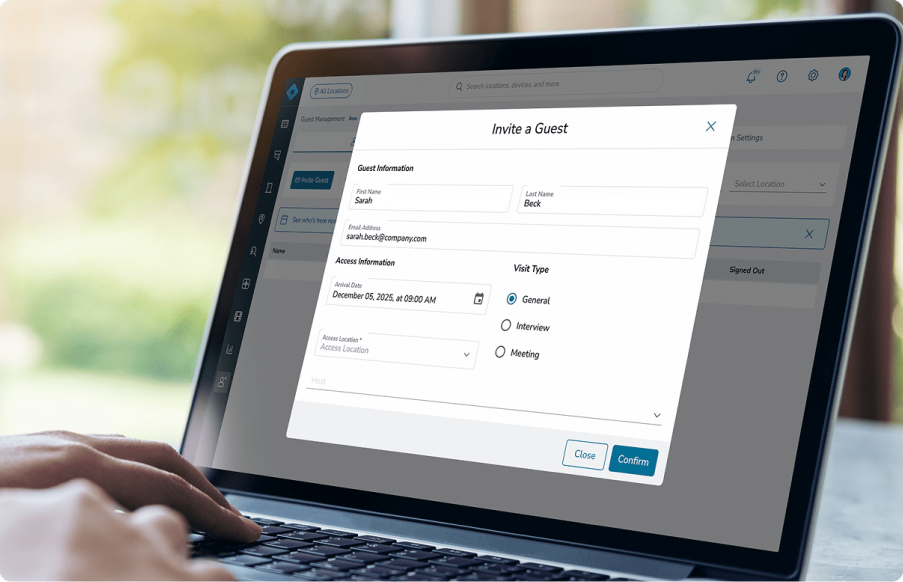
Visitor software handles the information you collect before a guest arrives and records their check-in at reception. Depending on the product and configuration, pre-registration may collect guest details before arrival, while a kiosk, tablet, or receptionist records check-in. Those steps record the visit, but they do not by themselves grant door access or attach camera footage to the guest record.
Rhombus Guest is our visitor-management product for offices evaluating Rhombus alongside access control and video. If you keep separate visitor software, check how its arrival record reaches your access and video systems. A supported integration may pass some events between them, while other handoffs may need configuration or a receptionist’s action.
Host notification
When a guest checks in, visitor software can alert the employee they came to see, using the host recorded during registration. A host alert may be part of the visitor product without requiring a door-access integration. Check the current Rhombus Guest notification options and confirm which event sends the alert.
A standalone visitor tool may send its own host alerts without any door-access integration. If the alert depends on a door event, you may need a supported integration, webhook, or configured automation.
Temporary door credential issuance and scope
A visitor check-in does not necessarily create a door credential. If a guest needs door access, the access-control system must recognize a credential with the appropriate permissions. Staff may create it manually, or a verified integration or automation may handle that step. For example, a contractor might need access to the lobby and one office door between 9 a.m. and 5 p.m. Verify that your access-control configuration can apply the required doors and time window to that credential.
Rhombus Access Control provides the door-access layer, . Neither the controller nor a visitor check-in alone establishes that a guest credential is issued automatically. Before relying on automatic issuance, confirm that your chosen guest workflow supports it natively or through a supported integration, configured automation, or application programming interface (API) work. If it does not, plan for staff to issue a badge or credential in the access-control system and check its permissions before the guest reaches the door.
Credential expiration and revocation
Set a visitor credential to expire at the end of its authorized access period when the access-control system supports timed expiration. Verify whether expiration is set when staff issue the credential or requires a separate rule, and test that the door rejects it after the scheduled time. Returning a physical badge does not disable its door permissions.
Early departures need a separate revocation step. If visitor and access records live in separate systems, a checkout may not disable the credential unless a supported integration or configured automation passes that event to the access system. Otherwise, staff must revoke the credential in the access-control system and confirm that the door no longer accepts it.
Linking visitor and door events to video evidence
When you investigate a visitor incident, a door event can help you find the relevant footage. Suppose a contractor checks in at 9 a.m. and a door records a credential use at 9:14. The credential event identifies the credential used, not necessarily the person who entered. Review footage from a camera that covers the entrance, if available, to investigate who used it.
A shared console can reduce the systems you search, but confirm whether a visitor record, a credential event, and footage are directly linked or merely available in the same platform. With separate systems, you may need to match timestamps and visitor identities across logs before finding the footage. That comparison also depends on accurate clock settings and a reliable link between the guest record and door credential.
When evaluating Rhombus Guest with Rhombus Access Control, ask for a demonstration using your intended cameras and doors. Confirm which events link to footage directly and which require a manual search.
Native integration versus standalone visitor software plus access control
If you want to administer visitor, door-access, and video products together, evaluate Rhombus Guest with Rhombus Access Control. Ask us to demonstrate how your intended guest credential is issued and expires, and which visitor or door events link directly to video. Shared administration alone does not confirm those workflows.
Keeping standalone visitor software can be the lower-disruption choice if your office recently installed door hardware or relies on visitor features you want to retain. If your visitor software is Envoy, review the Rhombus integration with Envoy and verify which records its current version exchanges. For other products, confirm that a supported integration exists before planning around one. Compare the actual guest workflow in both approaches, especially how a temporary credential gets issued and how you would find the matching door event and footage later.
Decision table: comparing the two approaches
Use the table to compare your required guest workflow against each product’s documented capabilities. A shared console does not prove that check-in automatically issues a door credential.
| Decision point | Rhombus Guest with Access Control | Standalone visitor software with access control |
|---|---|---|
| Guest credentials | Verify whether the intended issuance, door scope, and expiration workflows are supported natively, need configuration, or require staff action. | Verify whether the intended workflow uses a supported integration, configured automation, an application programming interface (API), or staff action. |
| Auditability | Guest and access products can be administered together; confirm whether visit and credential events are linked. | Check whether the integration associates visit and credential events or staff must match records manually. |
| Video correlation | Rhombus video is available in the platform; verify which events open related footage and which require a search. | Check for a supported video connection; otherwise, match event times to footage manually. |
| Implementation and information technology (IT) work | Assess hardware compatibility, installation, and configuration for the proposed Rhombus deployment. | Assess integration setup and maintenance; retaining current access hardware depends on compatibility. |
| Existing hardware | Check whether current readers, controllers, and wiring work with the proposed deployment. | Existing access hardware can remain if the visitor software connects to the current access system as required. |
| Existing visitor software | Better fit if you can adopt Guest. | Better fit if you need to keep specialized visitor workflows. |
If you already rely on visitor software, test its supported access and video connections before deciding whether a platform change would reduce work.
Questions offices ask before choosing
Can visitor credentials be limited to certain doors or hours? Yes, if your access control system supports those limits and the visitor workflow applies them. Confirm whether staff set the scope manually or a supported integration creates it.
What happens if one system goes down? Check how each proposed deployment handles a visitor-service outage, an access-control outage, and a network interruption. Whether check-in and existing credentials keep working depends on the products and configuration.
Will existing badge readers work with a cloud platform? Compatibility depends on the readers, credentials, controllers, and wiring you have. Check the hardware requirements before assuming you can keep the readers.
Which approach takes more IT work? A native platform may reduce the connections you maintain. Keeping separate systems may avoid replacing working hardware, but you must maintain the integration and check that visitor and door records stay in sync.
Choosing the right fit for your office
To assess Rhombus for your office, review Rhombus Guest Management and Rhombus Access Control against your required credential and video-review workflows. Ask for a demonstration with the doors, visitor permissions, and cameras you intend to use.
Keep standalone visitor software if its supported connection to your access system preserves visitor workflows or hardware you need. Choose a unified deployment only after verifying the credential and event-review steps that matter to your office.
%20--%3e%3csvg%20version='1.1'%20id='Layer_1'%20xmlns='http://www.w3.org/2000/svg'%20xmlns:xlink='http://www.w3.org/1999/xlink'%20x='0px'%20y='0px'%20viewBox='0%200%20110%20110'%20style='enable-background:new%200%200%20110%20110;'%20xml:space='preserve'%3e%3cstyle%20type='text/css'%3e%20.st0{fill:url(%23SVGID_1_);}%20%3c/style%3e%3cg%3e%3clinearGradient%20id='SVGID_1_'%20gradientUnits='userSpaceOnUse'%20x1='25.325'%20y1='766.725'%20x2='84.725'%20y2='707.325'%20gradientTransform='matrix(1%200%200%201%200%20-682)'%3e%3cstop%20offset='0'%20style='stop-color:%23006F94'/%3e%3cstop%20offset='1'%20style='stop-color:%2300C1DE'/%3e%3c/linearGradient%3e%3cpath%20class='st0'%20d='M106.9,47.5L62.5,3.1c-4.1-4.1-10.9-4.1-15,0L3.1,47.5c-4.1,4.1-4.1,10.9,0,15l44.4,44.4%20c4.2,4.2,10.9,4.2,15.1,0L107,62.5C111,58.4,111,51.6,106.9,47.5z%20M55.5,71.2c-9.4,0.3-17-7.3-16.7-16.7C39.1,46,46,39.1,54.5,38.8%20c9.3-0.3,17,7.3,16.7,16.7C70.9,64,64,70.9,55.5,71.2z'/%3e%3c/g%3e%3c/svg%3e)
Related Articles