Back to blog home
Visitor and Guest Management Systems: Features, Benefits, and Buying Guide
by Team Rhombus, on March 13th, 2026
Physical SecurityVisitor and Guest Management Systems: Features, Benefits, and Buying Guide
Paper sign-in sheets are still everywhere. They sit on clipboards at reception desks, collect illegible signatures, and go into a filing cabinet that nobody opens until something goes wrong. When something does go wrong, a paper log tells you that “J. Smith” signed in at 9:12 a.m. on March 4th. It won’t tell you whether J. Smith showed ID, which floor they visited, when they left, or whether they should have been allowed in at all.
A visitor management system replaces that clipboard with a digital workflow: registration, identity capture, badge printing, host notification, and a searchable record of every visit. The practical value is that it answers four questions after the fact: who arrived, when, where they went, and when they left.
What Is a Visitor Management System?
At its simplest, visitor management software digitizes the sign-in process. Visitors enter information on a tablet or kiosk, present an ID, get a badge, and trigger an alert to whoever they’re meeting. Every step gets logged.
More capable platforms layer on pre-registration, watchlist screening, temporary access credentials, and connections to cameras and door hardware. The difference between a basic sign-in tool and a full visitor management platform is roughly the difference between a doorbell and an access control system.
Visitor Management vs. Guest Management
These terms describe the same category. “Visitor management” tends to show up in security and compliance conversations. “Guest management” appears more in corporate reception and hospitality contexts. The label on the box matters less than whether the system handles your actual workflow, so evaluate capabilities rather than branding.
Where Visitor Workflows Fit in Physical Security
ASIS Security Management frames access control as a straightforward principle: allow entry to authorized people, deny entry to unauthorized people. Visitor handling complicates that principle because access is temporary, conditional, and needs to be documented within a compressed window. A visitor isn’t an employee with a permanent badge, and they aren’t an intruder. They’re somewhere in between, and most security programs don’t handle that in-between space well.
How Visitor and Guest Management Systems Work
Pre-registration and Invitations
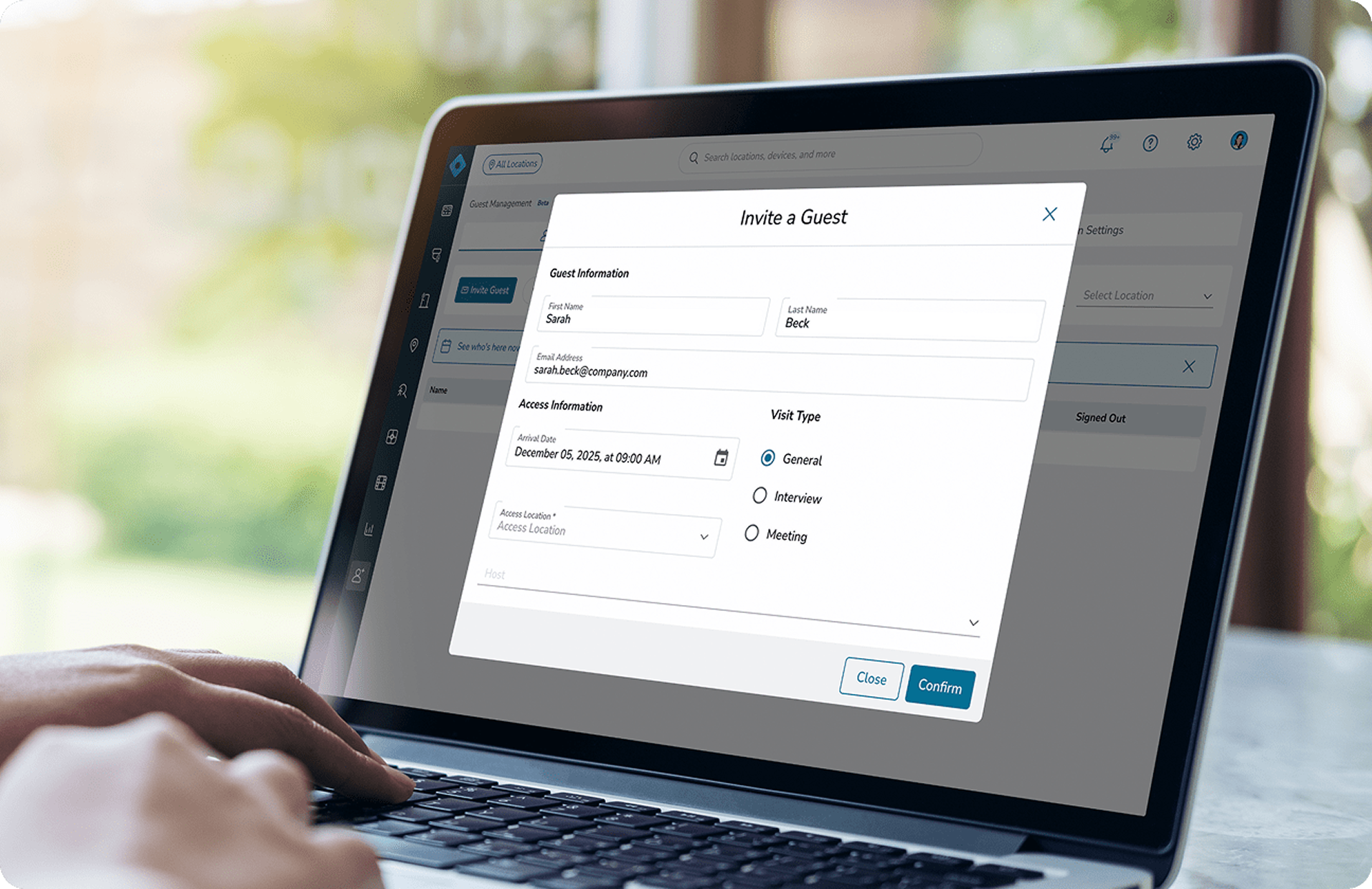
The smoothest visitor experiences start before arrival. Hosts enter visitor details in advance, and the guest receives an email with meeting info, location, and check-in instructions. Rhombus Guest supports these email invites and auto-fills the sign-in form when the visitor arrives, which cuts lobby wait times and gives security teams a heads-up on who to expect.
Check-in and Identity Capture
On arrival, visitors check in through a kiosk, tablet, or receptionist. The system collects a name, company, host, visit purpose, and typically a photo. How far identity capture goes depends on environment: a coworking space might only need a name and email, while a school district or government building will require a government-issued ID scan.
Badge Printing and Host Notifications
After check-in, the system prints a temporary badge and notifies the host. At USDA headquarters, once a visitor is signed in, an email notification is sent to the host employee, along with a phone call. That dual notification reduces the odds of someone waiting unattended in a lobby, which is a common failure point in buildings that rely on a receptionist to track people down manually.
Access, Tracking, and Check-out
Rhombus Guest logs entries and exits in console timeline views with real-time status, so security teams can see who is on-site at any moment alongside camera feeds and access events. Check-out can be manual or automatic. Either way, the departure gets logged and the visit record closes.
Core Features to Look For
ID Scanning and Visitor Screening
ID scanning captures data from a government-issued ID at the point of check-in. Screening runs that data against watchlists, sex offender registries, or internal ban lists. These are two separate functions that vendors often bundle together. You can scan without screening, but screening without scanning does not work.
Schools commonly require both, with systems configured to flag people who should not be on campus. The buyer question worth asking is whether screening rules can be configured by site or visitor type. A corporate headquarters screening contractors against an internal ban list operates differently than a school district screening every parent volunteer.
Visitor Badges and Sign-in Records
Printed badges do more than identify a guest. They show staff who belongs in the building, where that person is supposed to be, and when the visit started. Searchable sign-in records do the rest. They let security teams reconstruct who was in the building on any given day without flipping through a binder.
Access Control Integration
A printed badge is useful, but it does not open a door. In a low-volume office, that may be fine. In a busy building, it creates a bottleneck.
When visitor management connects to access control, the system can issue a temporary credential scoped to specific doors for the duration of the visit. A visitor attending a third-floor meeting should not have access to a server room. Rhombus Guest handles this inside the same platform teams already use for permanent credentials and door management, which means one console instead of three.
Video Security and Audit Trails
Text logs tell you someone checked in at 2:14 p.m. Video tells you what actually happened. The Rhombus and Envoy integration captures video clips on visitor entry, marks those events in the camera timeline, and stores searchable records that tie a visitor’s identity to on-site activity. Six months later, when an incident review depends on knowing who entered a specific corridor at a specific time, that linkage is the difference between a useful investigation and guesswork.
Compliance, Privacy, and Data Retention Controls
Visitor management systems collect personal data, full stop. That means consent workflows, role-based access to records, and configurable retention policies are not optional in regulated environments. Organizations operating under HIPAA, GDPR, or state privacy laws should verify that data handling matches their obligations before signing a contract. Rhombus publishes its security and privacy practices for buyers doing that due diligence.
Multi-site Administration and Reporting
If a visitor is flagged at one location, that flag should be visible at every other location in the network. Enterprise visitor management needs centralized policy control with room for local variation. A distribution center and a corporate lobby do not share the same risk profile, and the system should reflect that without requiring separate instances.
What Changes When You Move Off Paper
The case for digital visitor management is less about any single improvement and more about what stops breaking. Paper sign-in sheets fail quietly: a visitor skips the log, a receptionist forgets to call the host, a screening step gets dropped during a busy morning. Nobody notices until an incident forces a retroactive audit, and the audit turns up gaps.
Digital workflows do not eliminate human error, but they make skipped steps visible. If a visitor bypasses check-in, there is no record, and no record is itself a flag in a system that expects one. If a screening check returns a match, the system routes that alert to the right person in seconds rather than relying on a receptionist to remember a name from a memo sent three weeks ago.
The operational shift also changes how front desks spend their time. Pre-registration moves data entry to the host, auto-fill moves it to the system, and automated notifications remove the phone-tag loop of tracking down someone’s meeting contact. In a lobby processing 50 or more visitors a day, that recovered time is measurable in hours per week.
For audit and compliance teams, the difference is even more direct. A searchable, timestamped log with ID data and linked video can answer a regulator’s question in minutes. A paper binder requires someone to physically locate it, read the handwriting, and hope the relevant page was not lost or misfiled. Organizations in healthcare, education, and government that face periodic compliance reviews tend to feel this gap most acutely.
Benefits of Visitor Management Software
The benefits are operational before they are cosmetic. A digital process gives security teams a cleaner record, gives front desks a faster workflow, and gives visitors a more predictable arrival experience.
The security gain is straightforward. Unknown access gets harder, screening becomes consistent, and investigations start with a usable record instead of a clipboard and a guess.
The operational gain is just as practical. Pre-registration, self-serve check-in, and automated notifications reduce the amount of receptionist time spent on repetitive tasks.
The experience gain matters too. Nobody enjoys standing in a lobby filling out a form while the host is still unaware they have arrived.
Common Use Cases by Environment
Feature requirements vary sharply by environment. Buying a visitor management platform without accounting for your specific visitor mix and risk profile is like buying a security camera without knowing whether you need it indoors or outdoors.
Offices and corporate workplaces. The gap between a tech company protecting trade secrets and a consulting firm hosting client meetings is wider than most vendors acknowledge. The tech company wants ID scanning, NDA acknowledgment at sign-in, and pre-registration that feeds into screening workflows. The consulting firm wants a fast, polished guest check-in system that does not make a $2M client feel like they are entering a federal building. Both need visitor management, but their workflows barely overlap.
Schools and campuses. Schools carry the heaviest screening requirements in any vertical, and most are mandated by district policy rather than left to individual principals. Government ID checks, sex offender registry screening, and destination-specific badges are baseline expectations. The operational challenge is coverage: a single receptionist cannot monitor six entrances during morning drop-off. Campuses with multiple entry points need centralized administration and security tools that extend visibility beyond the main lobby, because the side door by the gym is just as exposed as the front entrance.
Healthcare facilities. Infection control changes the requirements entirely. During an outbreak, the ability to quickly identify every person who visited a specific ward on a specific day becomes operationally critical. Hospitals also restrict visitor access to pharmacies, patient care areas, and surgical floors using temporary credentials scoped by unit. Regulatory audits expect those records to be complete and retrievable on request.
Commercial buildings and multi-tenant properties. The complexity here is political as much as technical. Three tenants on the same floor may have three different screening requirements, three different host notification preferences, and three different opinions about lobby friction. A cloud visitor management platform with multi-tenant support can assign credentials scoped to approved areas without granting building-wide access. The property manager needs a single view across all tenants; each tenant needs to see only their own visitors.
Comparing Visitor Management Platforms
Buyers evaluating Rhombus Guest should also look at Envoy, Raptor, iLobby, and SwipedOn, among others. Each occupies a different position in the market.
Envoy Visitors is one of the most widely deployed visitor sign-in systems in corporate offices. It offers a polished front-desk experience, strong workplace integrations, and a well-designed mobile app. Envoy is a workplace platform first and a security product second, which makes it a natural fit for offices that prioritize guest experience over deep access control or video integration. Rhombus integrates with Envoy for organizations that want Envoy’s lobby experience combined with Rhombus camera and access control data.
Raptor Technologies dominates the K-12 market. It provides sex offender screening, custody alert management, and district-wide policy enforcement that schools specifically require. If the primary use case is education, Raptor is likely already on the shortlist. It is less commonly deployed in corporate or multi-tenant environments.
iLobby, now Soloinsight, targets enterprise and manufacturing environments with compliance-heavy workflows, contractor management, and integration with EHS systems. It serves a different buyer profile than a company looking for a unified physical security console.
SwipedOn competes at the lighter end of the market, offering simple, affordable visitor sign-in for small to mid-size offices that need digital check-in without deep security integration.
Rhombus Guest occupies a distinct position because it runs natively on the same console as Rhombus cameras, door access control, and sensors. For organizations that want visitor events, video, and access data in a single platform rather than stitched together through integrations, that architecture matters. The tradeoff is that the full value requires buying into the Rhombus ecosystem. Teams already running Rhombus for physical security get visitor management without adding another vendor. Teams committed to a different camera or access control stack should weigh that dependency.
The right choice depends on what is being optimized for: lobby experience, screening depth, compliance workflows, or unified physical security. No single product wins on every axis.
How to Evaluate a Visitor Management Platform
Most failed deployments start the same way: someone evaluated features in a clean demo environment and never stress-tested them against what actually happens in the lobby on a Monday morning. Before talking to vendors, walk the visitor workflow from the parking lot to the conference room and write down where screening gets skipped, where badges go unrecovered, and where records have gaps. Those breakdowns are the real requirements list.
Start with Policy and Workflow Requirements
Define who visits the facilities, what gets checked, and where access is allowed. A site that hosts ten contractors a day has different needs than one that processes 200 parent volunteers a week. Get specific about visitor types before comparing feature lists.
Map Features to Risk Level
Resist the instinct to buy for the worst-case scenario if that scenario describes 2% of visitor traffic. Schools, data centers, and healthcare facilities genuinely need screening, credential integration, and video linkage. A creative agency with ten visitors a week needs digital sign-in, badges, and host notifications. Overbuying adds configuration overhead and login fatigue that drives receptionists back to the clipboard within a quarter.
Check Integration Depth
Ask vendors to show, live, how the visitor check-in system connects with existing door hardware, cameras, employee directory, and notification tools. If the answer involves custom middleware or a professional services engagement, adjust the budget and timeline accordingly.
Rhombus Guest runs on the same platform as Rhombus cameras, sensors, and access control, so visitor events, video, and door activity share one console with no integration middleware. When a vendor’s integration story sounds clean in a slide deck but requires three tools to execute, that friction shows up every day.
Review Deployment and Administration
Ask about setup timelines, kiosk hardware requirements, user training, and how multi-site policy changes propagate. A system that takes four weeks to configure per site does not scale the same way as one that deploys in days.
Questions to Ask Vendors
These are the questions that expose whether a platform works outside the happy path.
On security and data handling: How is visitor identity data encrypted in transit and at rest? What retention policies can be configured, and can they vary by site or visitor type? How does consent collection work during check-in?
On workflows: How does the system handle different visitor types such as guests, contractors, and delivery drivers with different screening requirements? What happens when a visitor fails a screening check? Who gets notified, how fast, and what does the visitor see?
On integration and reporting: Which access control and video systems connect natively, without middleware? Can visitor events trigger automated actions in connected systems? Can reports span all sites from a single dashboard? Is there an open API for custom integrations?
The vendor who walks through a failed screening scenario on a live system will tell more in five minutes than the one who spends an hour on slides.
FAQ
What is the difference between a visitor management system and a guest management system?
Same category, different emphasis. Visitor management shows up more in security contexts. Guest management shows up more in corporate reception and hospitality settings.
Can visitor management integrate with existing access control?
Yes. How it integrates matters more than whether it can. Rhombus Guest issues temporary credentials that work with connected door controllers and expire automatically when the visit ends. Verify whether that connection is native or requires middleware, because the difference shows up in setup time, maintenance, and console sprawl.
Do schools need a different system than offices?
Not necessarily a different product category, but schools need capabilities many general platforms skip: government ID scanning, sex offender screening, destination-specific badges, and district-level policy enforcement across multiple campuses. If a platform supports configurable screening rules by site, it can work. Uniform screening with no per-site flexibility usually cannot.
How long should visitor data be retained?
The regulatory environment determines the answer. HIPAA, GDPR, and state privacy laws set different expectations. The right platform lets teams configure retention by site, visitor type, or data category rather than applying one blanket rule everywhere.
Picking the Right System
The most useful thing to do before contacting any vendor is walk the building during a busy morning and count the gaps: the side entrance where visitors skip sign-in, the contractor who gets waved through because the receptionist recognizes his face, the badge that sits on the conference table two hours after the visit ended. Those are the actual requirements, and they matter more than any feature matrix.
Match those gaps to vendor capabilities with the risk profile in mind. A 50-person office with low visitor volume and no regulatory burden should not buy the same system as a hospital or a school district. Overbuying leads to underuse, and underuse leads to receptionists taping the iPad to the wall and handing out blank sticker badges again.
If the organization already runs Rhombus for cameras or access control, Rhombus Guest is worth evaluating first because the visitor data lives in the same console, with no integration work required. If starting fresh or running a different physical security stack, compare Rhombus against Envoy, iLobby, Raptor, and SwipedOn using the criteria above. Request a demo to test how Rhombus Guest handles specific visitor types and site layout.
%20--%3e%3csvg%20version='1.1'%20id='Layer_1'%20xmlns='http://www.w3.org/2000/svg'%20xmlns:xlink='http://www.w3.org/1999/xlink'%20x='0px'%20y='0px'%20viewBox='0%200%20110%20110'%20style='enable-background:new%200%200%20110%20110;'%20xml:space='preserve'%3e%3cstyle%20type='text/css'%3e%20.st0{fill:url(%23SVGID_1_);}%20%3c/style%3e%3cg%3e%3clinearGradient%20id='SVGID_1_'%20gradientUnits='userSpaceOnUse'%20x1='25.325'%20y1='766.725'%20x2='84.725'%20y2='707.325'%20gradientTransform='matrix(1%200%200%201%200%20-682)'%3e%3cstop%20offset='0'%20style='stop-color:%23006F94'/%3e%3cstop%20offset='1'%20style='stop-color:%2300C1DE'/%3e%3c/linearGradient%3e%3cpath%20class='st0'%20d='M106.9,47.5L62.5,3.1c-4.1-4.1-10.9-4.1-15,0L3.1,47.5c-4.1,4.1-4.1,10.9,0,15l44.4,44.4%20c4.2,4.2,10.9,4.2,15.1,0L107,62.5C111,58.4,111,51.6,106.9,47.5z%20M55.5,71.2c-9.4,0.3-17-7.3-16.7-16.7C39.1,46,46,39.1,54.5,38.8%20c9.3-0.3,17,7.3,16.7,16.7C70.9,64,64,70.9,55.5,71.2z'/%3e%3c/g%3e%3c/svg%3e)